
Guard Your Release Classpath from Silent Dependency Changes
Here is a scenario that happens more often than it should: you bump a library from 1.4.2 to 1.5.0, CI goes green, you ship — and two weeks later you notice the APK is 800 KB heavier, or a new transitive dependency has started pulling in a network library you did not vet.
Nothing broke. Nothing warned you. The change was silent.
This is the transitive dependency problem. When you depend on a library you implicitly depend on everything that library depends on, and everything those libraries depend on. A version bump you consider routine can silently add, remove, or version-shift a dozen transitive dependencies. In a security-conscious or size-conscious project that is unacceptable.
The Dependency Guard Plugin
dependency-guard — maintained by Dropbox and used by Google’s Now in Android sample — solves this with a simple idea: commit a snapshot of the exact classpath that ships in your release build, and fail CI if it ever diverges from that snapshot without an explicit, reviewed update.
Setup
# gradle/libs.versions.toml
[versions]
dependencyGuard = "0.5.0"

[plugins]
dependency-guard = { id = "com.dropbox.dependency-guard", version.ref = "dependencyGuard" }
// app/build.gradle.kts
plugins {
    alias(libs.plugins.dependency.guard)
}

dependencyGuard {
    configuration("releaseRuntimeClasspath")
}
Run ./gradlew dependencyGuardBaseline once to generate the initial snapshot. Commit the result.
What the Baseline Looks Like
The plugin writes a plain-text file — one dependency per line, alphabetically sorted:
androidx.activity:activity-compose:1.12.2
androidx.activity:activity-ktx:1.12.2
androidx.activity:activity:1.12.2
androidx.annotation:annotation-experimental:1.5.1
...
com.google.firebase:firebase-analytics:22.4.0
com.google.firebase:firebase-auth:23.2.1
...
No DSL, no JSON, no binary format. The diff is readable in any code review tool. When a dependency is added, removed, or bumped, the change shows up as a one-line diff in the baseline file — and the reviewer has to explicitly approve it.
CI Enforcement
- name: Verify Dependency Guard
  run: ./gradlew dependencyGuard
dependencyGuard (without Baseline) compares the current classpath against the committed snapshot. If they diverge, the task fails with a clear message listing exactly what changed.
Dependency Guard Baseline does not match.
  + com.squareup.okhttp3:logging-interceptor:4.12.0
  - com.squareup.okhttp3:okhttp:4.10.0
  + com.squareup.okhttp3:okhttp:4.12.0
Updating is intentional: run dependencyGuardBaseline locally, review the diff, commit. It is the same workflow as updating a snapshot test baseline — explicit, traceable, and reviewable.
Why releaseRuntimeClasspath
You could guard debugRuntimeClasspath too, but the important thing is guarding what ships. releaseRuntimeClasspath is the exact set of JARs included in your release APK or AAB. Debug builds pull in extra tooling (LeakCanary, debug databases) that is irrelevant to supply-chain risk.
What This Protects Against
Accidental bloat. A library bump pulls in a new transitive dependency with a large footprint. Without the guard you might not notice until the next size audit.
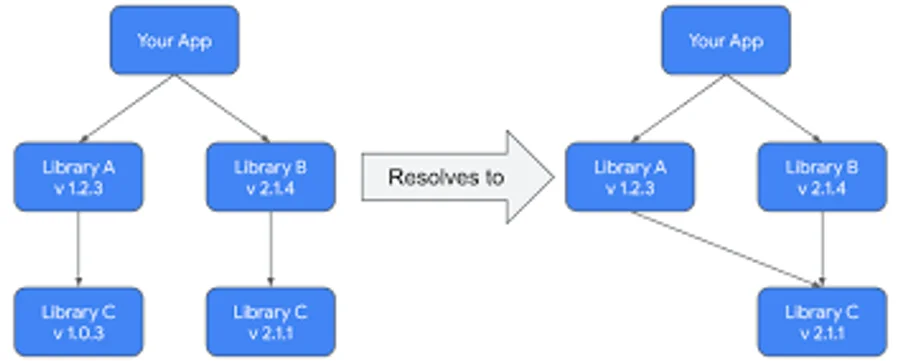
Unexpected version downgrades. Two libraries each pull a different version of a common transitive. Gradle’s version conflict resolution picks one quietly. The guard makes that resolution visible.
Supply-chain drift. A library you trust starts pulling in a new subdependency from an unfamiliar group. With the guard that change requires an explicit review before it can ship.
The Workflow in Practice
The discipline is light: when you touch libs.versions.toml and bump something, run dependencyGuardBaseline, look at the diff, commit it alongside the version bump. That two-minute habit gives you a full audit trail of every transitive change that has ever shipped in your app — for free, in git.